
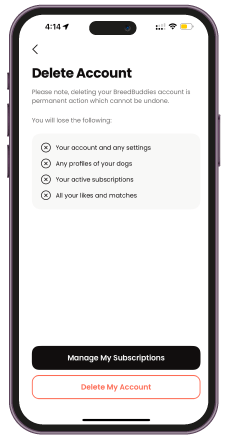
delete account
Need to Delete Your Account?
We’re sorry to see you go! If you wish to delete your BreedBuddies account, please follow the steps below.
How to Delete Your Account:
1. Log in to Your Account
Access your profile through the BreedBuddies App.
3. Go to Profile
Navigate to the bottom menu, and click profile.
3. Delete Account
Navigate to the profile page and locate the ‘Delete Account’ option.
4. Confirm Deletion
Follow the prompts to confirm your decision. You may be asked for feedback to help us improve.
5. Final Confirmation
Once confirmed, your account and all associated data will be permanently removed.
